Published: 9 May 2026
The Debt You Don’t See Until It’s Too Late
Accessibility debt isn’t just a UX problem. It’s a delivery problem, a procurement problem, and increasingly a legal problem. And unlike design debt, which is often cosmetic, accessibility debt affects whether people can use your product at all.
The good news: teams that address accessibility early don’t just avoid risk — they ship faster, reduce rework, and build more resilient systems.
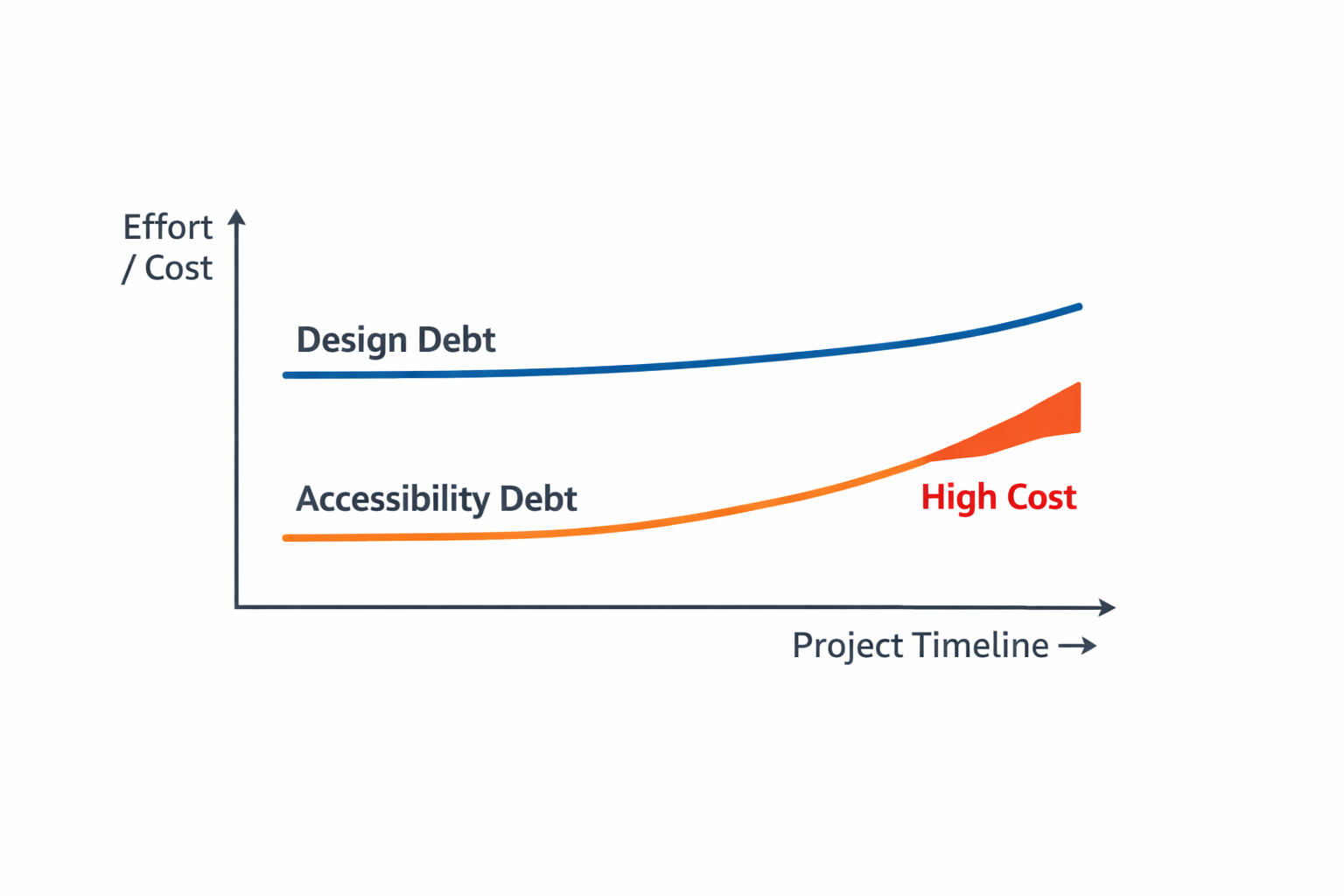
Why Accessibility Debt Is More Expensive Than Design Debt
Design debt slows teams down. Accessibility debt stops them entirely.
1. Late-stage fixes are exponentially more expensive
Fixing accessibility issues after development can cost 10–30x more than addressing them during design or build. Why? Because accessibility failures often require:
- Reworking component structure
- Rewriting interaction patterns
- Rebuilding entire flows
- Re-testing with assistive technologies
- Updating documentation and design system assets
A missing label isn’t just a missing label — it’s a symptom of a broken component, a flawed process, or a missing acceptance criterion.
In my early days at an Accessibility Consultancy, I reported on accessibility issues across hundreds of websites and apps. I doubt many were fixed – it’s too costly to rewrite a finished product!
2. Accessibility debt compounds across the system
If a single component is inaccessible, every instance of that component inherits the problem. One inaccessible modal can create 40 accessibility failures across a product.
3. It creates delivery friction
Teams with high accessibility debt experience:
- Slower QA cycles
- More bugs in production
- More escalations from users
- More procurement blockers
Accessibility debt is a delivery tax that never stops charging interest.
How Accessibility Debt Forms (and How to Spot It Early)
Accessibility debt rarely comes from one big mistake. It’s the accumulation of small decisions made under pressure.
1. Missing accessibility acceptance criteria
If “accessible” isn’t defined, it won’t happen. Teams often rely on good intentions instead of explicit requirements.
2. Inconsistent component usage
Developers build custom components when accessible versions already exist. Designers create bespoke patterns that break keyboard or screen reader expectations.
3. Semantic structure is an afterthought
Teams focus on visual layout instead of meaningful structure. This leads to heading chaos, unlabelled controls, and broken reading order.
4. No accessibility checks in early design
If accessibility isn’t considered in wireframes, prototypes and even experiments, it becomes a retrofit.
The ROI of Fixing Accessibility Early
Teams that shift accessibility left see measurable benefits.
1. Faster delivery
Accessible components reduce rework and speed up QA. Teams spend less time fixing regressions and more time shipping features.
2. Lower long-term cost
Fixing issues at the component level prevents hundreds of downstream failures.
3. Reduced legal and procurement risk
Government and enterprise buyers now require ACRs.
Accessibility debt directly affects sales cycles.
4. Better user experience for everyone
Accessibility improvements often improve clarity, consistency, and usability for all users.
Practical Strategies to Prevent Accessibility Debt
You don’t need a massive accessibility program to make meaningful progress. Start with the system.
In 2016 accessibility was an afterthought at the Australian Broadcasting Corporation (ABC). My audits revealed thousands of production bugs that rarely escaped busy team backlogs.
Supportive Product Managers helped me embed inclusive thinking from early design and through the product pipeline. This relatively small investment has yielded tremendous efficiencies and embedded an accessible-first mindset across product teams.
1. Design for diverse use
Add accessibility criteria to every user story. For example, how will people use it if they don’t use a mouse, or magnify the screen? Then make your rules simple, repeatable, and effective.
Examples:
- “All interactive elements must have accessible names.”
- “Focus order must follow visual order.”
- “Components must be operable with a keyboard.”
2. Build accessibility into your design system
Document accessibility expectations for each component:
- Keyboard behaviour
- ARIA roles
- Focus management
- Error handling
- Colour contrast
3. Build accessibly from the outset
Build components to meet accessibility expectations first-time, then check for achievement before release. Tip: Use automation wisely, not exclusively. Automation catches the basics so humans can focus on nuance.
4. Train designers and developers on semantic structure
Semantic HTML is the foundation of accessibility. Teams that understand it produce cleaner, more resilient code.
What High-Performing Teams Do Differently
The best teams treat accessibility as a quality attribute, not a compliance task. They:
- Use accessible components by default
- Pair designers and developers early
- Include accessibility in code reviews
- Maintain a living design system
- Test with assistive technologies regularly
They don’t wait for accessibility to become a crisis.
Fix the System, Not the Symptoms
Accessibility debt is inevitable — but unmanageable accessibility debt is not.
Teams that address accessibility early build better products, ship faster, and avoid costly rework.
If your team is feeling the weight of accessibility debt, the solution isn’t more effort — it’s better systems.
Services
Digital Product: Learn how AccessUX helps product teams build accessibility into their design and development process, from early design to delivery.